

概述
插入子句insert().into()向一个Schema中插入新的点、边。
语法
// 插入点
insert().into(@<schema>).nodes([
  {<property1>: <value1>, <property2>: <value2>, ...},
  {<property1>: <value1>, <property2>: <value2>, ...}
])

// 插入边
insert().into(@<schema>).edges([
  {<property1>: <value1>, <property2>: <value2>, ...},
  {<property1>: <value1>, <property2>: <value2>, ...}
])
- 在
into()方法中指定一个schema。 - 在
nodes()或edges()方法中添加一个或多个点或边。- 在
{ }里填写点、边属性键值对。 - 如果只插入一个点或一条边,可省略外层中括号
[ ]。
- 在
- 支持定义子句别名,数据类型为NODE或EDGE。
插入点:
- 没有任何属性值是必须指定的。
- 如果未指定点的唯一标识符属性
_id或_uuid的值,系统会自动生成其属性值。 - 未指定的自定义属性会被赋值为
null。
插入边:
- 必须指定
_from和_to属性值(或_from_uuid和_to_uuid属性值)以明确边的起点和终点。其他属性非必需提供。 - 如果未指定边的唯一标识符属性
_uuid的值,系统会自动生成其属性值。 - 未指定的自定义属性会被赋值为
null。
示例图集
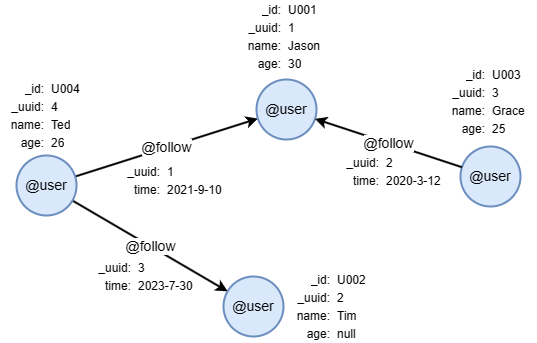
在一个空图集中,逐行运行以下UQL语句,创建示例图集:
create().node_schema("user").edge_schema("follow")
create().node_property(@user, "name").node_property(@user, "age", int32).edge_property(@follow, "time", datetime)
insert().into(@user).nodes([{_id:"U001", _uuid:1, name:"Jason", age:30}, {_id:"U002", _uuid:2, name:"Tim"}, {_id:"U003", _uuid:3, name:"Grace", age:25}, {_id:"U004", _uuid:4, name:"Ted", age:26}])
insert().into(@follow).edges([{_uuid:1, _from_uuid:4, _to_uuid:1, time:"2021-9-10"}, {_uuid:2, _from_uuid:3, _to_uuid:2, time:"2020-3-12"}, {_uuid:3, _from_uuid:4, _to_uuid:2, time:"2023-7-30"}])
示例
插入单个点
insert().into(@user).nodes({_id: "U005", name: "Alice"})
插入了一个点,包含以下属性:
| _id | _uuid | name | age |
|---|---|---|---|
| U005 | 5 | Alice | null |
插入单条边
insert().into(@follow).edges({_from: "U002", _to: "U001", time: "2023-8-9"})
插入了一条边,包含以下属性:
| _uuid | _from | _to | _from_uuid |
_to_uuid | time |
|---|---|---|---|---|---|
| 4 | U002 | U001 | 2 | 1 | 2023-08-09 00:00:00 |
插入多个点
insert().into(@user).nodes([
  {name: "Lee", age: 12},
  {_uuid: 10, name: "Alex"},
  {}
])
插入了三个点,包含以下属性:
_id |
_uuid | name | age |
|---|---|---|---|
| ULTIPA8000000000000009 | 6 | Lee | 12 |
| ULTIPA8000000000000005 | 10 | Alex | null |
| ULTIPA800000000000000B | 7 | null |
null |
插入多条边
insert().into(@follow).edges([
  {_from_uuid: 1, _to_uuid: 2},
  {_uuid: 9, _from: "U004", _to: "U003", time: "2023-9-10"},
  {_from: "U002", _to: "U003"}
])
插入了三条边,包含以下属性:
| _uuid | _from | _to | _from_uuid |
_to_uuid | time |
|---|---|---|---|---|---|
| 5 | U001 | U002 | 1 | 2 | null |
| 9 | U004 | U003 | 4 | 3 | 2023-09-10 00:00:00 |
| 6 | U002 | U003 | 2 | 3 | null |
返回插入的数据
insert().into(@user).nodes([
  {_id: "U006", name: "Joy"},
  {_id: "U007", age: 41}
]) as n
return n{*}
结果:
| _id | _uuid | name | age |
|---|---|---|---|
| U006 | 8 | Joy | null |
| U007 | 9 | null |
41 |
指定Point类型属性值
使用point()函数指定point类型属性的值。
insert().into(@city).nodes([
  { location: point({latitude: 132.1, longitude: -1.5}) }
])
指定Blob类型属性值
使用castToRaw()函数指定blob类型属性的值。
insert().into(@city).nodes([
  {profile_img: castToRaw("data:image/png;base64,iVBO0KGf8/9hAHNCSVQI=")}
])
指定List类型属性值
将list中的元素包裹在[ ]里,以,分开。每个元素的数据类型需与list类型一致。
本例插入一个点,并指定ratings属性(float[]类型)的值:
insert().into(@city).nodes([
  {ratings: [3.2, 6.7, 5.6, 5.6]}
])
指定Set类型属性值
将set中的元素包裹在[ ]里,以,分开。每个元素的数据类型需与set类型一致。
本例插入一个点,并指定tags属性(set(string))的值:
insert().into(@city).nodes([
  {tags: ["hot", "art", "food"]}
])
常见失败原因
- 指定的唯一标识符(
_id和_uuid)属性值在图集中已经存在。 - 指定的边起点或终点在图集中不存在。
- 未指定边的起点或终点。